Works with MSFS 2024: No – Native version available here
Works with MSFS 2020: Yes – Native
Important
Might overlap with Solar Farms of other airport and scenery addons.
Might overlap with Solar Farms of other airport and scenery addons.
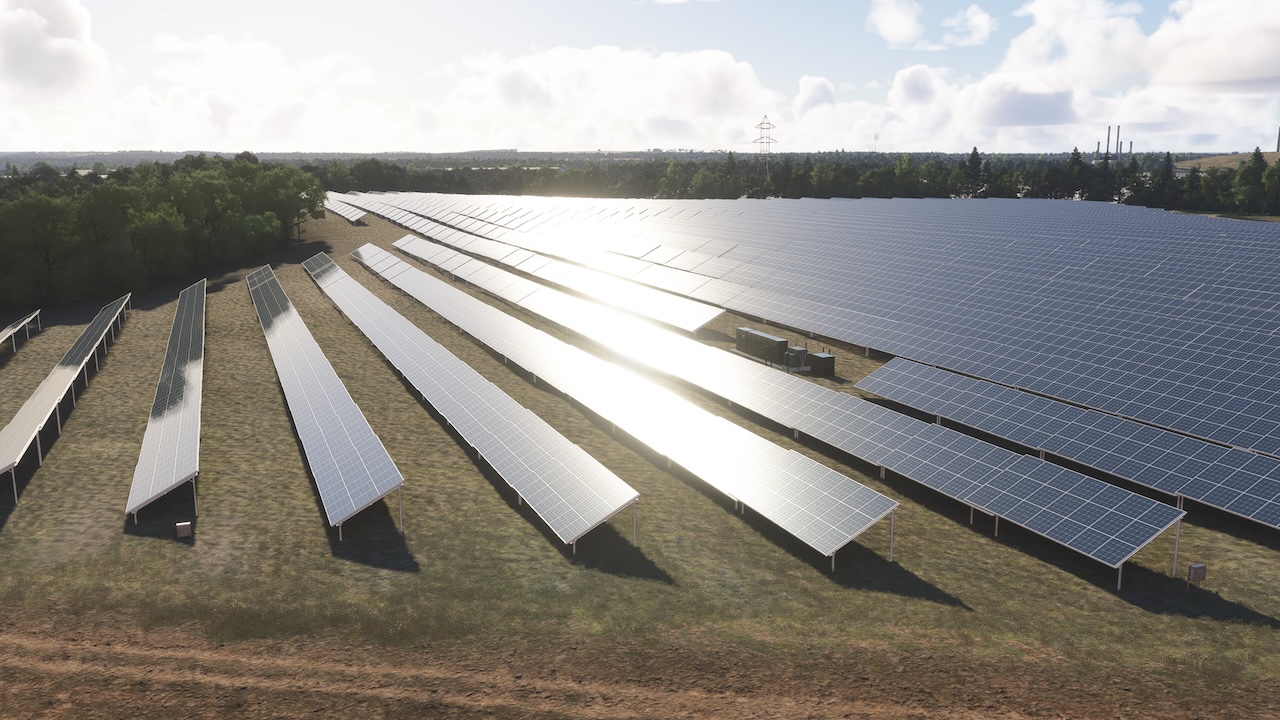
There are over 1,700 solar farms dotted across the British Isles, from the rolling fields of Southern England to the Irish midlands, and each one has been recreated in this package.
For the VFR pilot, they are crucial modern-day checkpoints. Following a chart, scanning the ground, and then spotting that specific solar array gleaming in the sun, precisely where it should be, is a truly satisfying … read moreexperience that adds a new layer of realism to any flight and a vast improvement on the default flat textures.
Spanning a total of 210 square kilometres, this package features a massive variety of sites based on real-world data:
• Over 1,700 distinct solar farm locations across the UK and Ireland
• 210 million m² (210 km²) of total custom scenery-an area larger than the city of Dublin!
• A huge variety of real-world sizes, from small local sites to massive regional solar parks over 3 square kilometres
• Full Physical Based Rendering (PBR) textures that shimmer and reflect realistically in all lighting conditions and weather
• Custom-modelled solar panels, inverters, and substations, all with 3 Levels of detail to avoid stutter and frame rate loss
• Seamless ground merging and terraforming that blends each site perfectly with the default MSFS scenery
Known Bugs:
• Occasionally there can be an issue with other addon scenery showing a different custom VOR at airports which clashing with this package. We have tried to mitigate this as much as possible by using exclusion tools, however it can still occur under the right circumstances
• Transparent and translucent glass panes can appear very dark when subject to particle effects such as rain, snow and fog. This is a known bug that Asobo/Microsoft are aware of and will hopefully fix in the near future
• When multiple sceneries are installed in the same area a bug showing the underlying stock photogrammetry can occur. This is a known bug which was introduced in SU11, Asobo/Microsoft are aware of it and will hopefully fix in the near future
For the VFR pilot, they are crucial modern-day checkpoints. Following a chart, scanning the ground, and then spotting that specific solar array gleaming in the sun, precisely where it should be, is a truly satisfying … read moreexperience that adds a new layer of realism to any flight and a vast improvement on the default flat textures.
Spanning a total of 210 square kilometres, this package features a massive variety of sites based on real-world data:
• Over 1,700 distinct solar farm locations across the UK and Ireland
• 210 million m² (210 km²) of total custom scenery-an area larger than the city of Dublin!
• A huge variety of real-world sizes, from small local sites to massive regional solar parks over 3 square kilometres
• Full Physical Based Rendering (PBR) textures that shimmer and reflect realistically in all lighting conditions and weather
• Custom-modelled solar panels, inverters, and substations, all with 3 Levels of detail to avoid stutter and frame rate loss
• Seamless ground merging and terraforming that blends each site perfectly with the default MSFS scenery
Known Bugs:
• Occasionally there can be an issue with other addon scenery showing a different custom VOR at airports which clashing with this package. We have tried to mitigate this as much as possible by using exclusion tools, however it can still occur under the right circumstances
• Transparent and translucent glass panes can appear very dark when subject to particle effects such as rain, snow and fog. This is a known bug that Asobo/Microsoft are aware of and will hopefully fix in the near future
• When multiple sceneries are installed in the same area a bug showing the underlying stock photogrammetry can occur. This is a known bug which was introduced in SU11, Asobo/Microsoft are aware of it and will hopefully fix in the near future
New comments disabled. Please follow our Help page on any problems or contact us for any suggestions.
Ireland, United Kingdom