Works with MSFS 2024: No – Native version available here
Works with MSFS 2020: Yes – Native
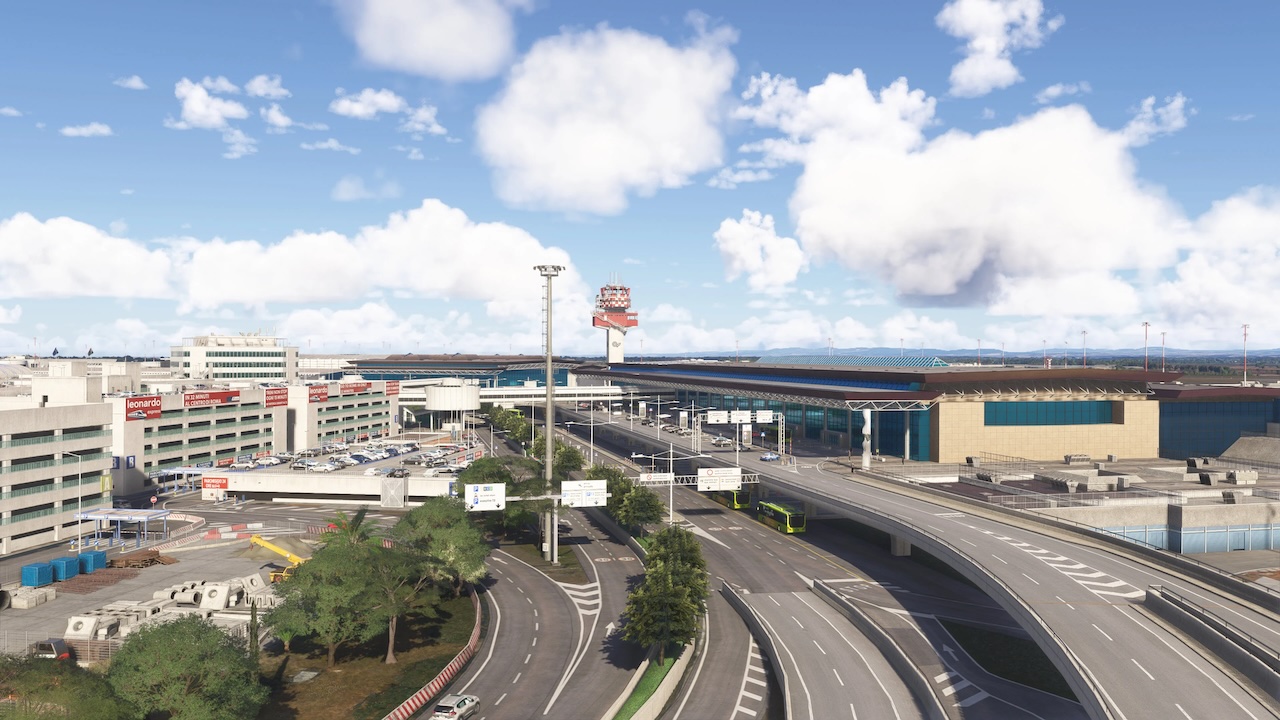
Welcome to Rome–Fiumicino Airport LIRF, officially known as Leonardo da Vinci International Airport – Italy’s busiest aviation hub and the main gateway to the Eternal City.
Located approximately 32 km west of Rome’s city center, Fiumicino serves as a major European and intercontinental hub, home to Alitalia/ITA Airways and a wide range of international carriers. The airport operates multiple runw … read moreays and modern terminal infrastructure, handling everything from short-haul regional traffic to long-haul widebody operations.
This scenery brings Rome–Fiumicino to life with a strong focus on realism, scale, and atmosphere, faithfully recreating one of Europe’s most important airports.
Features:
• Highly detailed and realistic rendition of Rome Airport (LIRF)
• High-quality 3D models and textures crafted with attention to detail
• Modeled and optimized terminal interiors
• Up-to-date ground layout
• Custom-designed, functional jetways
• Accurate and immersive lighting: custom approach, runway, taxiway lights
• Unique, hand-crafted taxiway signs, ground service and airport vehicle models
• Precise airport and runway elevation data for enhanced realism
• Custom points of interest in the close airport area
• Animated GSE vehicles, Trains and Flags
Located approximately 32 km west of Rome’s city center, Fiumicino serves as a major European and intercontinental hub, home to Alitalia/ITA Airways and a wide range of international carriers. The airport operates multiple runw … read moreays and modern terminal infrastructure, handling everything from short-haul regional traffic to long-haul widebody operations.
This scenery brings Rome–Fiumicino to life with a strong focus on realism, scale, and atmosphere, faithfully recreating one of Europe’s most important airports.
Features:
• Highly detailed and realistic rendition of Rome Airport (LIRF)
• High-quality 3D models and textures crafted with attention to detail
• Modeled and optimized terminal interiors
• Up-to-date ground layout
• Custom-designed, functional jetways
• Accurate and immersive lighting: custom approach, runway, taxiway lights
• Unique, hand-crafted taxiway signs, ground service and airport vehicle models
• Precise airport and runway elevation data for enhanced realism
• Custom points of interest in the close airport area
• Animated GSE vehicles, Trains and Flags
New comments disabled. Please follow our Help page on any problems or contact us for any suggestions.
Italy
Perfect one, automatic VGDS, no need to shift V.
Beautiful airport, perfect to fly online !
Hi!
Anyone experiencing apron lights out during night time?
Taxiways and rwys are lighted but apron not
Any idea on how to solve the problem?
thank you!
on approaching at rwy34L hard fps drop
Thanks Simplaza!
As of 24/04/2024 stands on terminal 1 are wrong and outdated. The one on flightsim.to has correct stands but no ground textures. Hopefully they will update soon
Super laggy. Maybe it’s that stupid Nool VDGS like with ESSA and EIDW
It seems to ctd the new version , anyone with this issue ?
https://sceneryaddons.org/help/
use addon linker to modify conflicting files!
Extremely laggy on final. Had like 5-10 fps and a ton of suttering. Once I had slowed down and went into taxiing it improved, but still not great.
Confirm!
version 1.1.1 it’s PERFECT thank you so much!!!!!
I’m soooo glad i kept the previous version. This one is crap.
your commentary would be usefull if you mention why and not just cry about it.
I think he referred to version 1.1.0, with no taxi markings.
anyone having taxiways/ground marking problems is using sim update 10 beta?
yes
I think the sim version has nothing to do with it. I have recovered the previous version of the scenario and it works fine. It would be helpful to know why this version goes like this.
How did you get the previous version? I need to go back to it.
Great scenery but don’t have a ground marks, like park number etc. Any idea for fix?
no parking numbers!!
v1.0.0 was 1.9GB, v1.1.0 only 900KB ?
900MB, yes. The old one used a custom aerial image which is no longer needed, v1.1 uses the updated Bing maps aerial image of World Update 9 (which is much better than the custom one).
to me the RAR is 236 MB! it’s correct ?
Yes
everyone having problems with the taxiway markings/numbers…using SU10 too?
Ground parking numbers disappeared! Is it only me??
For me too
same
no taxy ways markings on asphalt except for runways in this version, with or without rex global. Even the terrain altitude level is not on pair at the edge with default terrain.
no more taxy ways signs nor stands signs number (with or without rex global airport rwy) and elevation issues clearly visible with asobo terrain in perimeters!
Hello Simmers,
I wonder if anyone is experincing CTD after changing Airports!!
Almostmost all of the airports I installed make MSFS CTD!!
Anuone can help?
Thank you
Check the FAQ
Their airports always leave something to be desired. It’s like they almost go all the way but they stop.
Beautiful scenery. Only issue is, that most of the jetways, except perhaps the 703, either overlap/collide with the static ones, whenever the jetway is called/retracted. Oh and when retracted, they somehow penetrate the aircraft.
Thx a lot !
thanks
ahahahahah thnx
Thanks a lot SP!
grazie grazie grazie grazie grazie!!!
Thanks a lot – both thumbs up !!
Amazing ! Thank you
Best site of the world !!!!
merci beaucoup
best ever site! thx!!!
Woooo thank you so much
WOWWWWW thanks
Wow! stunning airport! Thanks a lot.
Comments are closed.