Works with MSFS 2024: Yes – Native
Works with MSFS 2020: No
Info
Note: See “dominicdesignteam-efb\VVTS_V2_Dual_Jetway_User_Guide.pdf” after extracting for an overview on how to use the app.
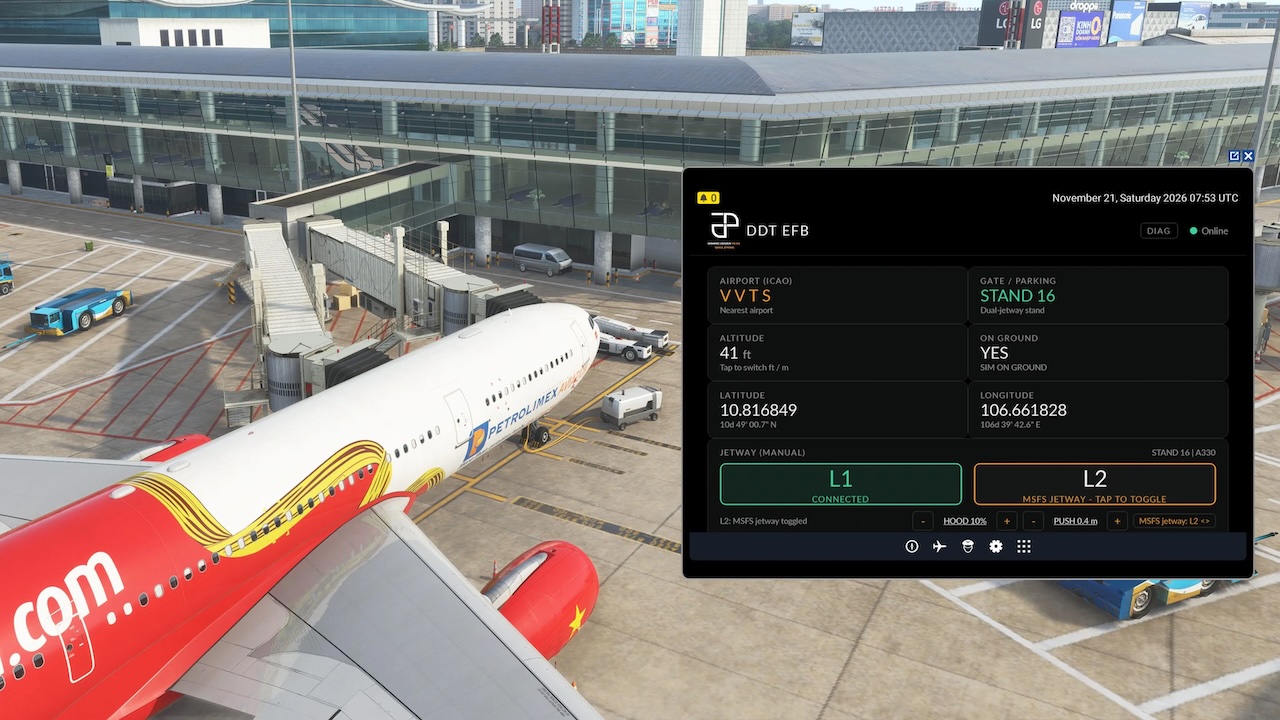
DominicDesignTeam EFB App adds a working second jet bridge to DominicDesignTeam airports, controlled right from the in-sim EFB tablet. The default MSFS jetway serves the second door, while a second bridge connects to the front door of your widebody, so passengers board through two doors like at the real airport.
Available now at VVTS V2 – Tan Son Nhat International, gates 9 to 16. More DominicDes … read moreignTeam airports will be supported in future updates.
Features:
• Second jet bridge on your tablet: Connect L1 and L2 separately, one tap each, from the EFB app
• Live door tracking: The app reads the real position of your aircraft’s L1 door and works out the bridge path on the fly. It still connects if you stop up to 15 m from the stop mark
• Realistic motion: The bridge rotates first, extends to a waiting point, then moves straight in to the door. It never sweeps across the nose. It retracts the same way
• Docking guidance: Remaining distance, left/right offset and “in reach” status are shown live on the tablet while you taxi in
• Fine-tuning, saved per aircraft: HOOD, BEND, PUSH, SHIFT, ANGLE and HEIGHT let you perfect how the canopy and cab meet the fuselage. Tuned defaults are included for every supported aircraft
• Safe by design: The bridge retracts by itself if the aircraft starts moving. The L1 button stays locked for aircraft that are not supported
• Works alongside the default jetway: Users without the app, or who use GSX Pro, still get the default MSFS jetway at every gate
• Plug and play: No external program, no WASM module
Supported aircraft:
• iniBuilds A350 (900 / 1000)
• PMDG 777 (200ER / 200LR / 300ER / F)
• Airbus A330
• Other aircraft, including the Boeing 787 and 747, use the default MSFS jetway only
Good to know:
• The second bridge moves only while the DominicDesignTeam EFB App is running
• In multiplayer, the second bridge moves on your own computer only
New comments disabled. Please follow our Help page on any problems or contact us for any suggestions.
Global