Works with MSFS 2024: Yes – Native
Works with MSFS 2020: No
Info
Note: This airport conflicts with Asobo Studio KDFW and Imagine Simulation KDFW airport, only use one of the three or you will run into problems. Follow our Help page on how to uninstall default MSFS airports.
Optional Configuration: To remove various objects on the airport, go to “inibuilds-airport-kdfw-dallas\Scenery\airport-inibuilds-dallas\inibuilds-scene” and rename the following files:
• (Med Performance Impact) Remove Apron clutter: kdfw-scene-apron_clutter.bgl -> kdfw-scene-apron_clutter.bgl.disabled
• (Low Performance Impact) Remove 3D Cars: kdfw-scene-cars.bgl -> kdfw-scene-cars.bgl.disabled
• (Med Performance Impact) Remove GSE: kdfw-scene-gse.bgl -> kdfw-scene-gse.bgl.disabled
• (Med Performance Impact) Remove 3D People: kdfw-scene-people.bgl -> kdfw-scene-people.bgl.disabled
• (Low Performance Impact) Remove Animated Skylink: kdfw-scene-skylink.bgl -> kdfw-scene-skylink.bgl.disabled
• (Low Performance Impact) Remove Static Aircraft: kdfw-scene-statics.bgl -> kdfw-scene-statics.bgl.disabled
• (Low Performance Impact) Remove Freight Trucks: kdfw-scene-trucks.bgl -> kdfw-scene-trucks.bgl.disabled
Note: This airport conflicts with Asobo Studio KDFW and Imagine Simulation KDFW airport, only use one of the three or you will run into problems. Follow our Help page on how to uninstall default MSFS airports.
Optional Configuration: To remove various objects on the airport, go to “inibuilds-airport-kdfw-dallas\Scenery\airport-inibuilds-dallas\inibuilds-scene” and rename the following files:
• (Med Performance Impact) Remove Apron clutter: kdfw-scene-apron_clutter.bgl -> kdfw-scene-apron_clutter.bgl.disabled
• (Low Performance Impact) Remove 3D Cars: kdfw-scene-cars.bgl -> kdfw-scene-cars.bgl.disabled
• (Med Performance Impact) Remove GSE: kdfw-scene-gse.bgl -> kdfw-scene-gse.bgl.disabled
• (Med Performance Impact) Remove 3D People: kdfw-scene-people.bgl -> kdfw-scene-people.bgl.disabled
• (Low Performance Impact) Remove Animated Skylink: kdfw-scene-skylink.bgl -> kdfw-scene-skylink.bgl.disabled
• (Low Performance Impact) Remove Static Aircraft: kdfw-scene-statics.bgl -> kdfw-scene-statics.bgl.disabled
• (Low Performance Impact) Remove Freight Trucks: kdfw-scene-trucks.bgl -> kdfw-scene-trucks.bgl.disabled
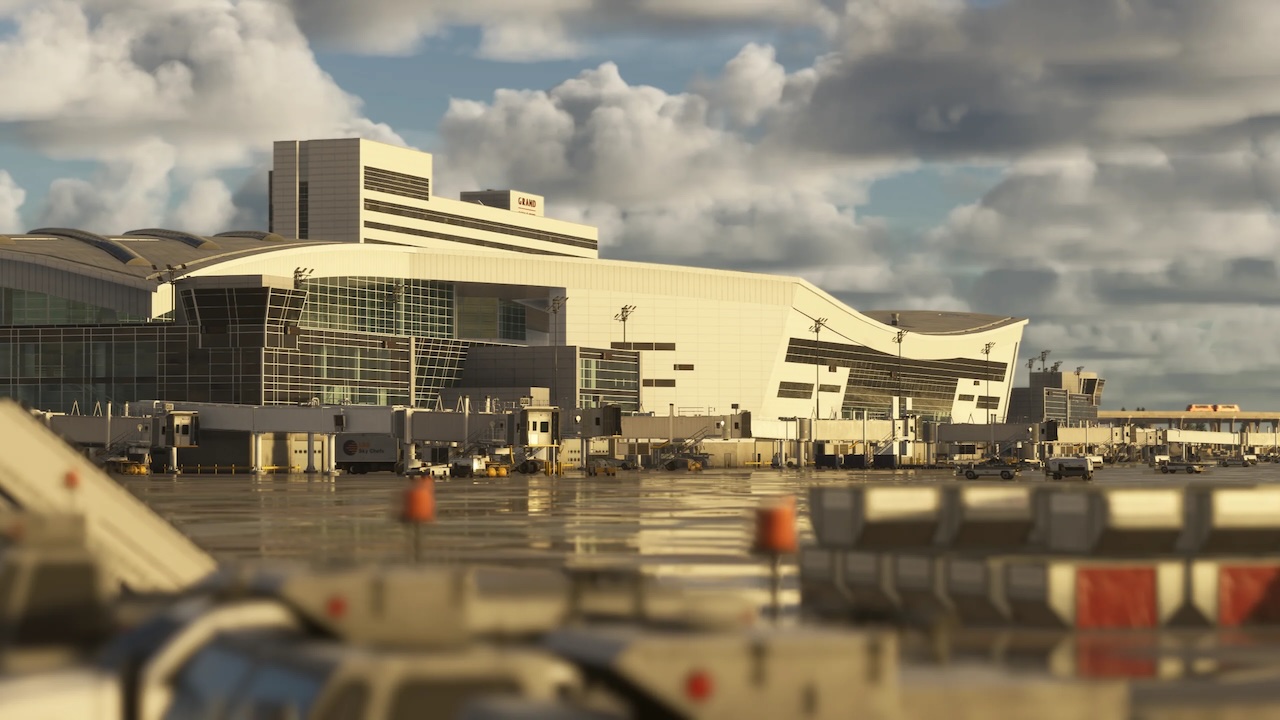
Experience Dallas–Fort Worth like never before with our premium rendition of Dallas–Fort Worth International Airport (KDFW) for Microsoft Flight Simulator 2024, developed from the ground up to deliver an amazing experience alongside smooth performance.
As one of the world’s busiest and most important aviation hubs, DFW serves as a global gateway and the primary home of American Airlines, handling … read more everything from ultra-long-haul international services to dense domestic and regional operations. This scenery features highly detailed terminals, accurate taxiway and runway layouts, realistic airport signage, and bespoke ground service equipment, bringing the full scale and complexity of this iconic mega-hub to life.
• Fully modelled and animated Skylink Air Train system connecting all terminals
• Custom construction zones and active development areas positioned around the airfield to reflect real-world expansion
• Detailed elevated taxiway bridges crossing roads
• Hand-made ground textures with crisp, bespoke texture sets for runways, aprons, paths, and roads
• True-to-life airport landside recreation with custom ground decals, signposts, vegetation, parking barriers, and more
• Accurately modeled and positioned dynamic airport lighting for enhanced realism
• 180+ hand-crafted models featuring custom-made buildings, vehicles, and objects
• Hand crafted terminals with crisp textures providing a fresh, modern appearance
• HD jetways with intricate details enhancing the airport’s realism
• Highly detailed models of all airport buildings, objects, and surroundings
• Full HD ground poly matching the 2025 airport layout
• Up-to-date airport layout reflecting the current, real-world location
• Official GSX profile included in the scenery folder and iniManager download
• Level of Detail (LOD) optimization for every model ensuring the best performance possible
• Use of the latest MSFS 2024 SDK features for optimal performance and smooth experience
• Bespoke taxi signage true to real-world specifications
As one of the world’s busiest and most important aviation hubs, DFW serves as a global gateway and the primary home of American Airlines, handling … read more everything from ultra-long-haul international services to dense domestic and regional operations. This scenery features highly detailed terminals, accurate taxiway and runway layouts, realistic airport signage, and bespoke ground service equipment, bringing the full scale and complexity of this iconic mega-hub to life.
• Fully modelled and animated Skylink Air Train system connecting all terminals
• Custom construction zones and active development areas positioned around the airfield to reflect real-world expansion
• Detailed elevated taxiway bridges crossing roads
• Hand-made ground textures with crisp, bespoke texture sets for runways, aprons, paths, and roads
• True-to-life airport landside recreation with custom ground decals, signposts, vegetation, parking barriers, and more
• Accurately modeled and positioned dynamic airport lighting for enhanced realism
• 180+ hand-crafted models featuring custom-made buildings, vehicles, and objects
• Hand crafted terminals with crisp textures providing a fresh, modern appearance
• HD jetways with intricate details enhancing the airport’s realism
• Highly detailed models of all airport buildings, objects, and surroundings
• Full HD ground poly matching the 2025 airport layout
• Up-to-date airport layout reflecting the current, real-world location
• Official GSX profile included in the scenery folder and iniManager download
• Level of Detail (LOD) optimization for every model ensuring the best performance possible
• Use of the latest MSFS 2024 SDK features for optimal performance and smooth experience
• Bespoke taxi signage true to real-world specifications
New comments disabled. Please follow our Help page on any problems or contact us for any suggestions.
United States