Works with MSFS 2024: Yes – Native
Works with MSFS 2020: No
Info
Note: This airport conflicts with Asobo Studio KORD and FSDreamTeam KORD airport, only use one of the three or you will run into problems. Follow our Help page on how to uninstall default MSFS airports.
Note: An optional tool to control Multi-Jetways on the airport is available here.
Optional Configuration: To remove various objects on the airport, go to “inibuilds-airport-kord-chicago\Scenery\inibuilds-scene” and rename the following files:
• (Low Performance Impact) Remove Landside cars: kord-scene-cars.bgl -> kord-scene-cars.bgl.disabled
• (Low Performance Impact) Remove Airside custom GSE models: kord-scene-gse.bgl -> kord-scene-gse.bgl.disabled
• (Low Performance Impact) Remove People: kord-scene-ppl.bgl -> kord-scene-ppl.bgl.disabled
• (Low Performance Impact) Remove VDGS stands (for use with GSX Pro): kord-scene-vdgs.bgl -> kord-scene-vdgs.bgl.disabled
• (Low Performance Impact) Remove T1 – Interior Detail: kord-scene-t1-highdetail.bgl -> kord-scene-t1-highdetail.bgl.disabled
• (Low Performance Impact) Remove T2 – Interior Detail: kord-scene-t2-highdetail.bgl -> kord-scene-t2-highdetail.bgl.disabled
• (Low Performance Impact) Remove T3 – Interior Detail: kord-scene-t3-highdetail.bgl -> kord-scene-t3-highdetail.bgl.disabled
• (Low Performance Impact) Remove T5 – Interior Detail: kord-scene-t5-highdetail.bgl -> kord-scene-t5-highdetail.bgl.disabled
• (Low Performance Impact) Remove Animated Train: kord-scene-train.bgl -> kord-scene-train.bgl.disabled
Note: This airport conflicts with Asobo Studio KORD and FSDreamTeam KORD airport, only use one of the three or you will run into problems. Follow our Help page on how to uninstall default MSFS airports.
Note: An optional tool to control Multi-Jetways on the airport is available here.
Optional Configuration: To remove various objects on the airport, go to “inibuilds-airport-kord-chicago\Scenery\inibuilds-scene” and rename the following files:
• (Low Performance Impact) Remove Landside cars: kord-scene-cars.bgl -> kord-scene-cars.bgl.disabled
• (Low Performance Impact) Remove Airside custom GSE models: kord-scene-gse.bgl -> kord-scene-gse.bgl.disabled
• (Low Performance Impact) Remove People: kord-scene-ppl.bgl -> kord-scene-ppl.bgl.disabled
• (Low Performance Impact) Remove VDGS stands (for use with GSX Pro): kord-scene-vdgs.bgl -> kord-scene-vdgs.bgl.disabled
• (Low Performance Impact) Remove T1 – Interior Detail: kord-scene-t1-highdetail.bgl -> kord-scene-t1-highdetail.bgl.disabled
• (Low Performance Impact) Remove T2 – Interior Detail: kord-scene-t2-highdetail.bgl -> kord-scene-t2-highdetail.bgl.disabled
• (Low Performance Impact) Remove T3 – Interior Detail: kord-scene-t3-highdetail.bgl -> kord-scene-t3-highdetail.bgl.disabled
• (Low Performance Impact) Remove T5 – Interior Detail: kord-scene-t5-highdetail.bgl -> kord-scene-t5-highdetail.bgl.disabled
• (Low Performance Impact) Remove Animated Train: kord-scene-train.bgl -> kord-scene-train.bgl.disabled
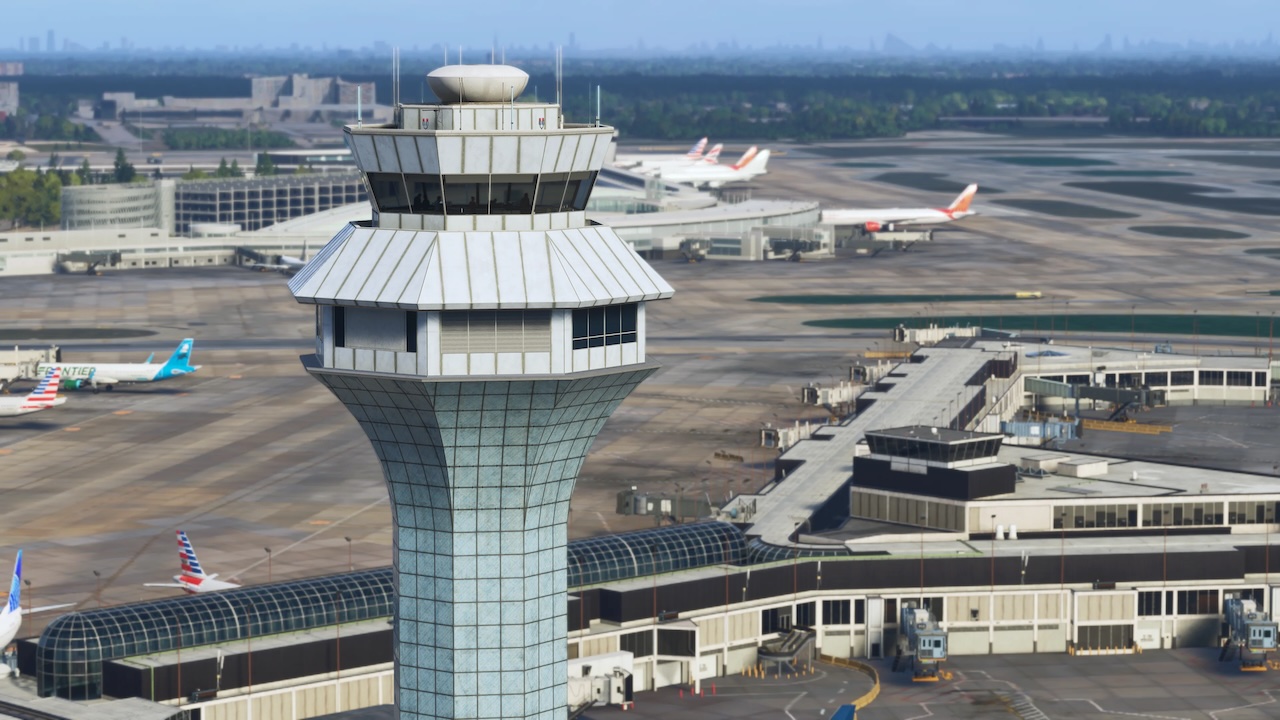
Experience one of the world’s busiest and most iconic aviation hubs with our rendition of Chicago O’Hare International Airport (KORD) for Microsoft Flight Simulator 2024, developed from the ground up to deliver an exceptional balance of visual fidelity, operational realism and smooth performance.
As a major gateway to North America and a global hub for both passenger and cargo traffic, Chicago O’ … read moreHare is home to an immense variety of domestic, international and regional operations. From its sprawling terminal complex and vast network of runways to its constant flow of aircraft from airlines around the world, O’Hare offers one of the most dynamic flying experiences in the simulator.
This scenery features highly detailed terminals, accurately recreated taxiways and runway layouts, realistic signage, bespoke ground service equipment, an extensively modelled airport environment, and introduces iniBuilds Multi-Jetway Technology, allowing compatible aircraft to connect to multiple passenger boarding bridges simultaneously for an even more authentic turnaround experience.
Features:
• Hand-made ground textures with crisp, bespoke texture sets for runways, aprons, paths, and roads
• Introducing iniBuilds Multi-Jetway Technology, allowing compatible aircraft to connect to multiple passenger boarding bridges simultaneously
• True-to-life airport landside recreation with custom ground decals, signposts, vegetation, parking barriers, and more
• Accurately modeled and positioned dynamic airport lighting for enhanced realism
• Hundreds of hand-crafted models featuring custom-made buildings, jetways, vehicles, and airport objects
• Highly detailed hand-crafted terminals and concourses with crisp, bespoke textures throughout
• Highly detailed models of all airport buildings, objects, and surroundings
• Full HD ground poly matching the latest real-world airport layout as of 2026
• Up-to-date airport layout reflecting the current, real-world location
• Official GSX profile included in the scenery folder and iniManager download
• Level of Detail (LOD) optimization for every model ensuring the best performance possible
• Use of the latest MSFS 2024 SDK features for optimal performance and smooth experience
• Bespoke taxi signage true to real-world specifications
As a major gateway to North America and a global hub for both passenger and cargo traffic, Chicago O’ … read moreHare is home to an immense variety of domestic, international and regional operations. From its sprawling terminal complex and vast network of runways to its constant flow of aircraft from airlines around the world, O’Hare offers one of the most dynamic flying experiences in the simulator.
This scenery features highly detailed terminals, accurately recreated taxiways and runway layouts, realistic signage, bespoke ground service equipment, an extensively modelled airport environment, and introduces iniBuilds Multi-Jetway Technology, allowing compatible aircraft to connect to multiple passenger boarding bridges simultaneously for an even more authentic turnaround experience.
Features:
• Hand-made ground textures with crisp, bespoke texture sets for runways, aprons, paths, and roads
• Introducing iniBuilds Multi-Jetway Technology, allowing compatible aircraft to connect to multiple passenger boarding bridges simultaneously
• True-to-life airport landside recreation with custom ground decals, signposts, vegetation, parking barriers, and more
• Accurately modeled and positioned dynamic airport lighting for enhanced realism
• Hundreds of hand-crafted models featuring custom-made buildings, jetways, vehicles, and airport objects
• Highly detailed hand-crafted terminals and concourses with crisp, bespoke textures throughout
• Highly detailed models of all airport buildings, objects, and surroundings
• Full HD ground poly matching the latest real-world airport layout as of 2026
• Up-to-date airport layout reflecting the current, real-world location
• Official GSX profile included in the scenery folder and iniManager download
• Level of Detail (LOD) optimization for every model ensuring the best performance possible
• Use of the latest MSFS 2024 SDK features for optimal performance and smooth experience
• Bespoke taxi signage true to real-world specifications
New comments disabled. Please follow our Help page on any problems or contact us for any suggestions.
United States